Hello, I am Prashant Rewar
In this article I will be covering:
- How and why did I started to Make an AdBlocker Extension?
- Idea and Thought behind it.
- Initial Roadmap and Goals.
- Exploring ways to make extensions.
- Taking it to enterprise level.
- Difficulties and short-comings on my way and how I tackeled them.
- Tech Stack
- Why React in frontend?
- Structure of project and vite config for making builds
- Manifests funda:
- What is difference btw Manifest v2 and v3 in context of Ad-blocking (webRequests and declarativeNetRequests)
- Why webRequests(Manifest v2) is Depricted,What are Security concerns accociated with It?
- How Passwords and Other Sensitive Data can Be stolen easily Using webRequests?
- How declarativeNetRequests overcome those security concerns?.
- Ad Blocking using declarativeNetRequests:
- How to block Ads - (Identify API request->Block->Repeat)
- Limitations of declarativeNetRequests
- Mischlaneous:- Why it cannot bypass CORS error
- Tackle the 'It looks like you are using AdBlocker, Please disable it to continue using this website'
- Apply Dynamic Rules
- The Youtube Ad-services:
- How the new Ad-Service of Youtube Works?
- Block Request-based Ad.
- Server-side Ad Rendering.
- How it is Implemented in Youtube?
- Basic ways tackle such ADs
- Why declarativeNetRequests cannot Directly Block these Ads?
- Still How can we block these Ads from declarativeNetRequests
- Frontend Skipping - Not traditional but always working
- Some Other Ways to Implement Ad-Service in your website that declarativeNetRequests can't block
- Conclusion
Let's Start:
So it was just A normal day, I with my friend Jai was watching live sports on JioStar platfarm, He had a subscription of it, But still No-Ads was not included in his Subscription, It was taking 99Inr Additional per month for that. He asked me to do something of Ads, His AdBlocker was not blocking those. Ofcourse the solution was a Chrome Extension that Either somehow skip Or Hide or block the Ad.
I started Reverse Eingineering from the exact moment, Opened network tab in devTools and started observing the request pattern within a couple of observing, I got to know that it is using ad service from hesads.akamaized.net, I blocked the domain from devTools and suprisingly it worked by just blocking one domain. There was not a single Ad.
See photo below:
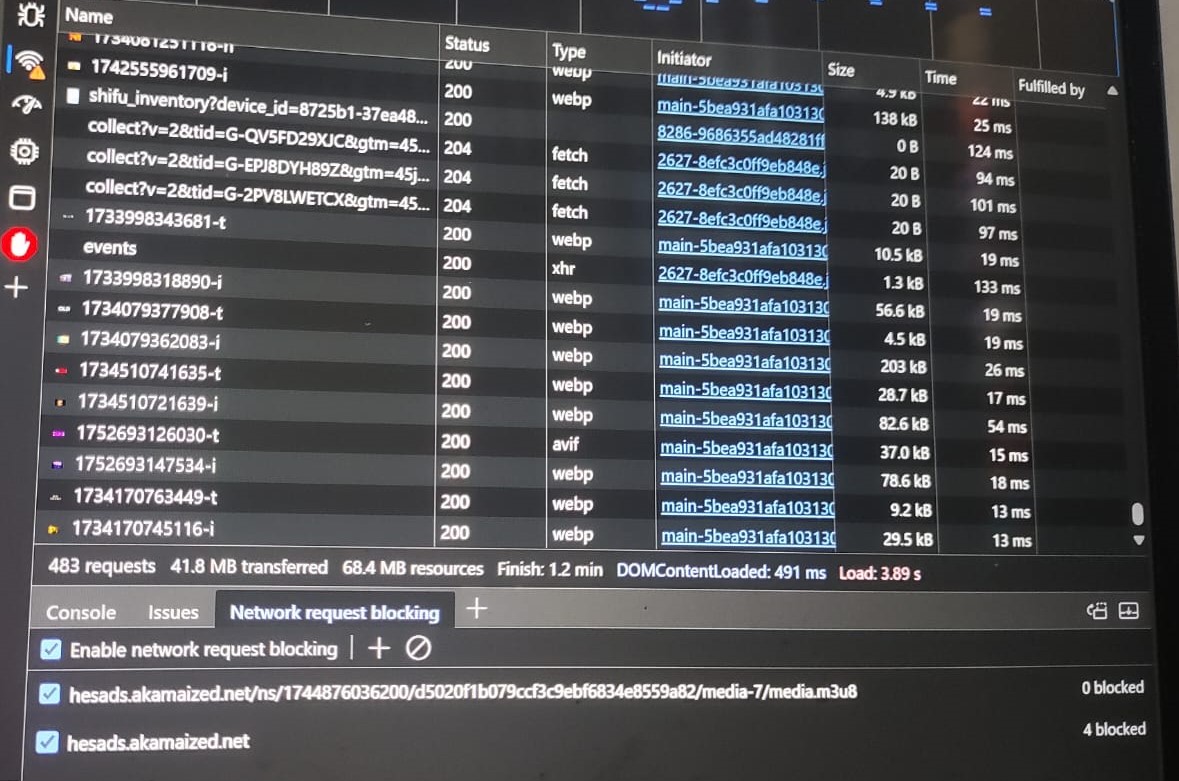
This made me more curious and I started Researching and collectiong Data for making an Ad-blocker Extension
Different Ways to Block An Ad:
-
Network Request
- Blocking: Identify and block network requests that are used to load an Ad.
- Modifying: Modify request headers to get a null/useless response or Modify the response to nullify it.
- Forwarding: Forward it to a custom hosted server that gives a null/useless or required response.
-
Frontend Modification
- Hide Ads Sections and divs in HTML
- Run custom site-to-site based Scripts to skip Ad (Note that a network request can not be interfered using console or by running a script)
Initial Roadmap and Goals:
- Make an Extension that blocks this domain.
- It should have option to stop and start.
So I started exploring ways to make extensions. I have already made few extensions using plain JavaScript, But this time I wanted to make something big, Something scalable and maintainable. So I decided to use React for frontend. It will help me to make a better UI and UX. Also I can use hooks and other React features to make the code more organized. I will be covering this in detail in another article, How I Built a Chrome Extension with React. Till now I had no idea about Manifests and their versions. So I started exploring about it.
-
What is Manifest?
- A manifest is a JSON file that contains metadata about the extension, such as its name, version, permissions, and other settings. It is the first file that is loaded when the extension is installed or updated.
-
Different Versions of Manifest. There are different versions of manifest, The main difference btw manifest versions is the APIs they support, In context of Ad-blocking, There are two main versions of manifest that are relevant:
- Manifest V2: The older version of the manifest that has been used for many years. It allows extensions to use the webRequest API to intercept and modify network requests.
- Manifest V3: The newer version of the manifest that is being adopted by Google and other browsers. It replaces the webRequest API with the declarativeNetRequest API, which is more restrictive and limits the ability of extensions to modify network requests.
-
Why Google is pushing for Manifest V3? People have different opinions about why Google is pushing for Manifest V3, Some say it is to improve security and privacy, while others say it is to limit the power of ad-blocking extensions. Here are some of the main reasons why Google is pushing for Manifest V3:
- Security and Privacy Concerns: The webRequest API allows extensions to access and modify all network requests, which can be a security and privacy risk. Malicious extensions can use this API to steal sensitive data, such as passwords and credit card numbers.
- Performance Improvements: The declarativeNetRequest API is designed to be more efficient, secure and performant than the webRequest API. It allows extensions to define rules for blocking or modifying requests, which can be processed more quickly by the browser.
-
How webRequest API can be exploited?
- Access to Sensitive Data: The webRequest API allows extensions to access all network requests, including those that contain sensitive data, such as passwords and credit card numbers. Malicious extensions can use this API to steal this data and send it to remote servers.
- Examples of Exploits: Click here to see different examples of exploits using MV-2
-
How it impacts Ad-blocking extensions?
- Limitations of declarativeNetRequest: The declarativeNetRequest API has several limitations that impact ad-blocking extensions. For example, it has a limit on the number of rules that can be defined, which can make it difficult to block all ads on a website. It also does not allow extensions to modify request headers or responses, which can limit their ability to block certain types of ads.
- Challenges in Blocking Ads: Ad-blocking extensions may face challenges in blocking ads that are served through complex mechanisms, such as server-side rendering or dynamic content loading. These types of ads may not be easily identifiable through static rules defined in the declarativeNetRequest API.
...... To be contined (Will continue writing another day)